Gaming & Entertainment / Review
Xbox Wireless Controller Review: A Familiar Layout With Platform Details to Check
The current Xbox Wireless Controller is a straightforward choice for an Xbox setup and a familiar option for compatible PC gaming. Its usefulness comes from broad familiarity rather than an elaborate collection of specialty controls.
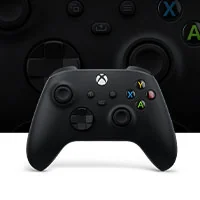
The current Xbox Wireless Controller is a straightforward choice for an Xbox setup and a familiar option for compatible PC gaming. Its usefulness comes from broad familiarity rather than an elaborate collection of specialty controls.
The core design
Microsoft specifies textured contact surfaces, a hybrid directional pad, button mapping and Bluetooth connectivity for supported devices. The controller's shape and offset stick arrangement are central to the buying decision; no specification can tell you whether that layout feels right in your hands.
Check the exact platform and connection method. Bluetooth, a wired connection and Xbox's own wireless connection are not interchangeable descriptions of every feature. Headset support and other functions can depend on the device and connection used.
Include power and accessories
Confirm the power arrangement in the selected package and decide how you will manage replacements or charging. Special editions and bundles can have different contents. A charging accessory should be matched to the controller rather than assumed compatible because it uses a familiar connector.
Try the directional pad and triggers with the kinds of games you play. A controller that feels natural in a racing game may create a different preference in a platformer or fighting game. Familiar button labels can reduce setup friction, but comfort still deserves a direct check.
Verdict
The Xbox Wireless Controller is a sensible default for supported Xbox and PC use when the layout suits the player. It is less compelling if advanced remapping hardware, extra rear controls or a different stick arrangement are requirements. Verify the exact device support, power plan and accessories before buying. A standard controller often offers the best value when its standard features are exactly the ones needed.
Sources and product information
What works well
- Familiar Xbox layout
- Hybrid directional pad
- Supported-device Bluetooth connectivity
What to consider
- Features depend on platform and connection
- Specialty controls require a different model
At a glance
- Layout
- Offset analog sticks
- Directional pad
- Hybrid D-pad
- Connections
- Platform-dependent wireless, Bluetooth and wired options