Gaming & Entertainment / Review
Corsair K65 PLUS WIRELESS Review: A compact mechanical keyboard with room for customization
The Corsair K65 PLUS WIRELESS is a good fit for someone who wants a compact mechanical keyboard for both games and ordinary desktop work. Its 75-percent layout removes the number pad while retaining arrows and…
Review basis: This is a research-based editorial review of manufacturer documentation and published product specifications, not a hands-on test. Ratings reflect documented features and buying tradeoffs; performance claims are attributed to their sources.
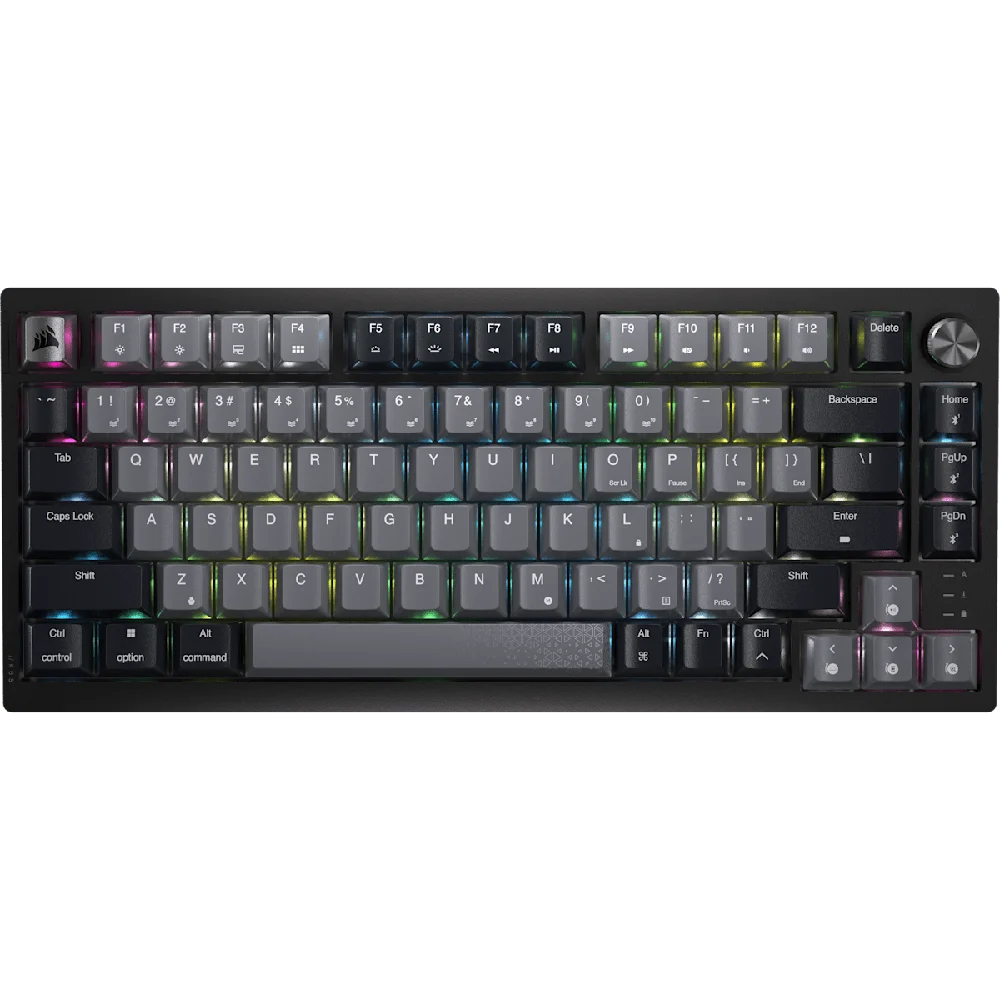
The Corsair K65 PLUS WIRELESS is a good fit for someone who wants a compact mechanical keyboard for both games and ordinary desktop work. Its 75-percent layout removes the number pad while retaining arrows and a function row. That arrangement saves desk width without requiring the more extensive layers associated with some smaller keyboards.
The reference version uses pre-lubricated MLX Red linear switches and supports hot-swapping. Corsair also documents 2.4GHz wireless, Bluetooth and wired operation. These features make it more adaptable than a keyboard tied to a single connection method, but the exact regional layout and switch configuration should still be checked before purchase.
Compactness should solve a desk problem
A narrower keyboard can bring the mouse closer and create more space for movement. That is useful for a gaming desk or a workstation with limited width. Someone who enters large amounts of numerical data may still prefer a number pad, whether integrated or separate. The ideal layout follows the workload rather than a trend toward fewer keys.
The compressed navigation area requires some adjustment for users accustomed to a full-size keyboard. Compare the actual key positions, especially those used by touch. Keeping arrows and function keys is helpful, but their presence does not make the spacing identical to a larger board.
Linear MLX Red switches do not provide the same tactile event as a tactile switch. The pre-lubricated construction and internal sound-dampening layers describe Corsair's approach to feel and acoustics, not a guarantee of a particular sound in every room. Desk surface, typing force and personal preference all influence the experience.
Customization is useful when it stays compatible
Hot-swappable sockets allow supported switches to be changed without soldering. That is a useful maintenance and preference feature for someone who understands the compatible parts. Check switch and keycap fit before ordering replacements, particularly when moving between ANSI and ISO layouts or selecting unusual key sizes.
The multiple wireless options allow the board to serve different devices, while the wired path is useful for a permanent desk. Feature availability and configuration can differ by connection and operating system. Verify the functions needed for the actual setup instead of assuming every mode behaves identically.
Corsair's up-to-266-hour battery claim is specified with 2.4GHz use and RGB lighting off. Enabling lighting changes the power calculation, so the headline number should not be used as a promise for an illuminated setup. Choose a charging routine that matches how the keyboard will be configured.
Our verdict favors the K65 PLUS WIRELESS for buyers who want a compact, customizable mechanical board with flexible connections. It is less suitable when a number pad or a tactile switch feel is essential. Its value is strongest when the layout and supported customization solve real preferences at the desk.
Sources and specifications
What works well
- Compact layout retains arrows and function row
- Multiple connection methods
- Hot-swappable mechanical switches
What to consider
- No integrated number pad
- Linear switches are a personal preference
- Battery claim assumes lighting is off
At a glance
- Layout
- 75%
- Reference switches
- Pre-lubricated MLX Red linear
- Connections
- 2.4GHz, Bluetooth and wired USB
- Customization
- Hot-swappable switches