Computers & Laptops / Review
CalDigit TS4 Review: A permanent dock for a heavily connected laptop
Eighteen ports, 98W host charging and 2.5Gb Ethernet make the TS4 a substantial desk dock rather than a travel hub.
Review basis: This is a research-based editorial review of manufacturer documentation and published product specifications, not a hands-on test. Ratings reflect documented features and buying tradeoffs; performance claims are attributed to their sources.
The workload that justifies it
The CalDigit TS4 makes sense when a laptop repeatedly returns to a desk filled with peripherals. It can centralize displays, storage, networking, memory cards and audio behind a single host connection. That is a concrete convenience for a workstation that would otherwise require a chain of small adapters. It is less attractive for someone who needs only an HDMI socket and one USB port. In that case, a compact hub is easier to carry, simpler to place and unlikely to leave most of its connections permanently unused.
Port variety is the main attraction
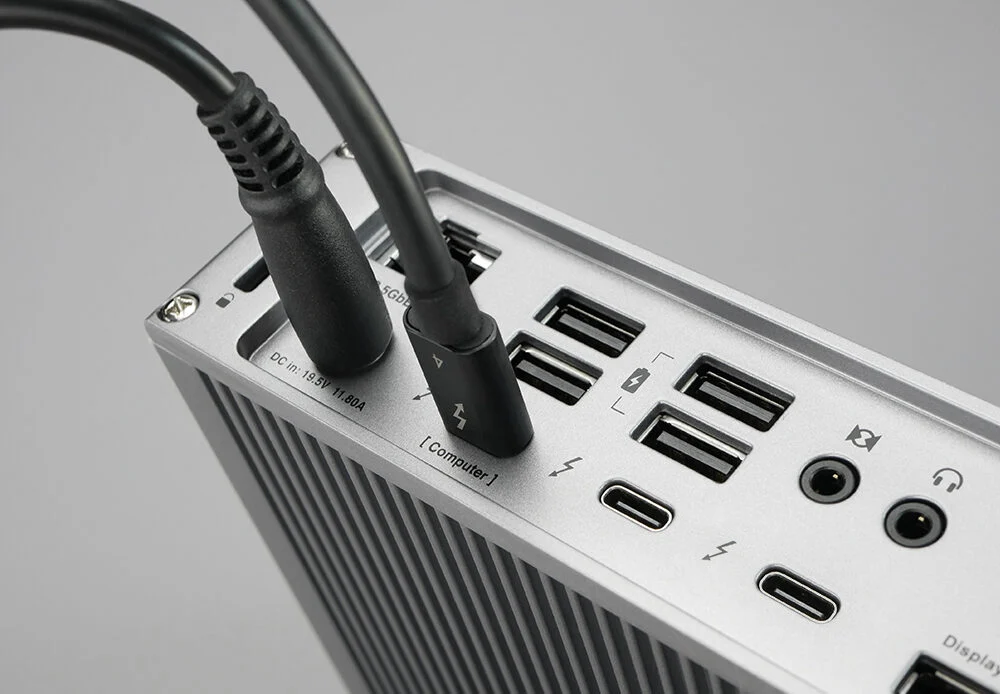
CalDigit counts eighteen connections, including Thunderbolt 4, USB-A, USB-C, DisplayPort, SD and microSD readers, audio and 2.5Gb Ethernet. The mix is more important than the count. Dedicated card slots are useful for photographers, while wired networking can matter to large file transfers or a desk with inconsistent Wi-Fi. A user who never handles cards or wired audio may value the same dock less. Count your actual devices, including which ones need fast data and which merely need charging, before treating every socket as equally useful.
One cable does not remove compatibility checks
The TS4 can provide up to 98W of host charging. That suits many laptops, but a power-hungry workstation may still need its own charger under demanding use. Display support depends on the host computer, operating system and connection method; a dock does not bypass the computer's native external-display limits. This is particularly important when comparing different Apple silicon generations or connecting a machine through ordinary USB-C rather than Thunderbolt. Map the intended monitors and resolutions against CalDigit's compatibility guidance before ordering additional adapters or cables.
Designed to stay on the desk
The metal body can be positioned vertically or horizontally, which helps fit it into a crowded arrangement. The separate power supply is part of that arrangement too, so account for the brick and cable routing rather than measuring only the attractive dock enclosure. Front-access connections are useful for temporary devices, while permanent cables can remain at the rear. That organization is the everyday benefit: arriving with a laptop should involve one predictable connection rather than rebuilding the desk. For travel, the same substantial package becomes unnecessary baggage.
Verdict
Buy the TS4 if a broad, stable connection layout will save repeated setup work and you have checked its compatibility with your exact laptop and displays. Its range of ports and host power make a coherent permanent workstation tool. Choose a simpler hub for occasional presentations, or a newer higher-bandwidth dock only when your host and devices can actually exploit it. The TS4's value is not that eighteen ports sound impressive. It is that the particular mix can keep a busy desk organized without relying on several separate adapters and chargers.
Sources
What works well
- Broad mix of 18 connections
- Up to 98W host charging
- 2.5Gb Ethernet and two card formats
What to consider
- Separate power brick needs space
- Display support remains host-dependent
- Excessive for a simple travel setup
At a glance
- Host interface
- Thunderbolt 4
- Connections
- 18 total
- Host power
- Up to 98W
- Ethernet
- 2.5GbE
- Card readers
- SD and microSD
- Placement
- Vertical or horizontal