Computers & Laptops / Review
Logitech MX Anywhere 3S Review: A travel mouse with a serious scroll wheel
The compact Anywhere 3S suits mobile work and multi-computer setups, with size as both its advantage and its compromise.
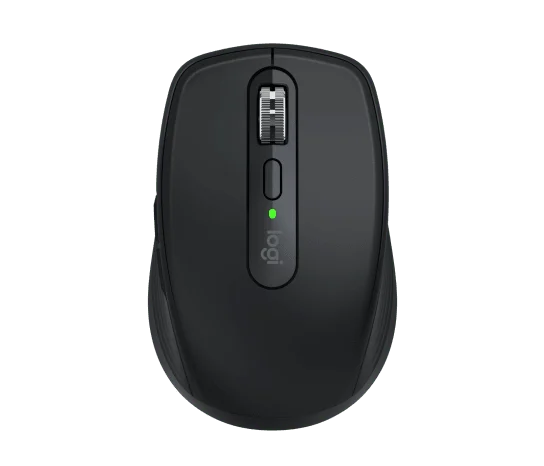
Review basis: This is a research-based editorial review of manufacturer documentation and published product specifications, not a hands-on test. Ratings reflect documented features and buying tradeoffs; performance claims are attributed to their sources.
Best for a bag, not every hand
The MX Anywhere 3S is a compelling choice when a mouse must travel with a laptop but still offer more control than a basic compact model. Its small body, configurable buttons and MagSpeed wheel make sense for people who move between offices, kitchen tables and meeting rooms. The same compactness can be a drawback for someone who prefers a full palm-supporting shape throughout a long desk day. Choose it because the size fits both your bag and your grip, not because the MX name guarantees the ideal shape for every hand.
The wheel is the main feature
The electromagnetic scroll wheel can move between controlled stepping and fast scrolling. That is useful for long documents and spreadsheets, where repeatedly dragging a scroll bar becomes tiresome. Horizontal movement is available by holding a side button while turning the wheel, rather than through a separate thumb wheel. This distinction matters if wide spreadsheets or timelines dominate your work. A larger mouse with a dedicated horizontal control may be more direct, while the Anywhere keeps its compact outline by combining actions on fewer physical controls.
Connectivity needs one small check
The mouse can pair with up to three devices over Bluetooth and switch between them. It also supports Logi Bolt, but the standard consumer package does not include the receiver. Older Logitech receivers are not automatically interchangeable with Bolt. If you plan to use the mouse with a desktop that lacks Bluetooth, include the receiver in the purchase comparison. Software customization is another consideration: Logi Options+ provides the richer configuration on supported Windows and macOS systems, while basic compatibility on another platform does not imply the identical software experience.
Travel and charging
Logitech specifies a sensor range up to 8,000 DPI and tracking that includes glass of the required thickness. The useful implication is flexibility across work surfaces, not a need to operate at maximum sensitivity. A controlled pointer setting that suits your screen is more valuable than the largest number. USB-C charging is convenient alongside a modern laptop, and the manufacturer claims up to 70 days per charge depending on use. Treat that as a charging-planning estimate rather than a guaranteed interval. Keeping the supplied cable accessible is still worthwhile.
Verdict
Buy the MX Anywhere 3S if you regularly carry your mouse, switch between computers and spend enough time scrolling to appreciate its wheel. Its focused feature set makes a good mobile-office package without the footprint of a large desktop mouse. Choose a larger ergonomic shape for full-time desk comfort if this body feels too small, or a simpler travel mouse if you will rarely use customization and multi-device pairing. The strongest value is in the combination of compactness and useful controls; neither the sensor specification nor the premium branding should outweigh a comfortable fit.
Sources
What works well
- Compact body for travel
- MagSpeed wheel with stepped and fast scrolling
- Pairs with up to three devices
What to consider
- Logi Bolt receiver not included
- Small shape may not suit long palm-grip sessions
- Horizontal scrolling uses a button combination
At a glance
- Sensor
- 200–8,000 DPI
- Buttons
- 6
- Devices
- Up to 3
- Connections
- Bluetooth; optional Logi Bolt
- Charging
- USB-C
- Claimed battery
- Up to 70 days, use-dependent