Computers & Laptops / Review
Logitech MX Keys S Review: A full-size keyboard for mixed-computer work
Backlighting, a number pad and three-device switching make MX Keys S a practical desk keyboard for people who prefer low-profile keys.
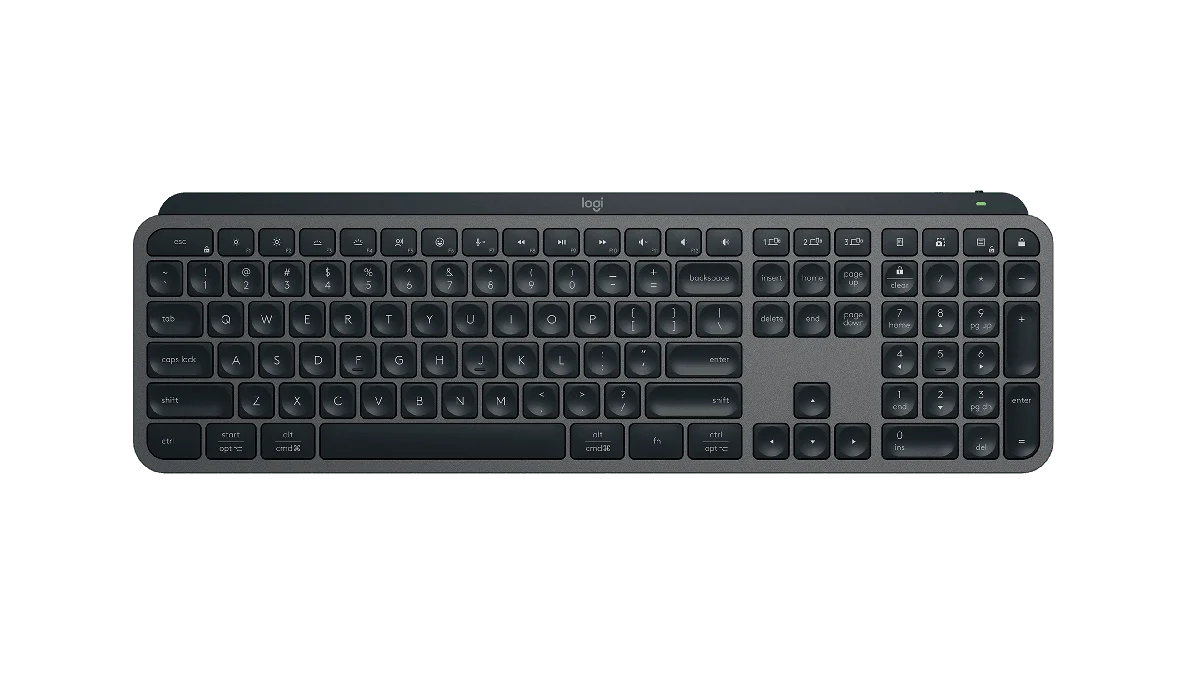
Review basis: This is a research-based editorial review of manufacturer documentation and published product specifications, not a hands-on test. Ratings reflect documented features and buying tradeoffs; performance claims are attributed to their sources.
Where it fits
MX Keys S is a good fit for someone who wants a full-size keyboard with a number pad and a relatively low profile, without entering the world of mechanical switch customization. Its appeal is a coherent office feature set: illuminated keys, wireless connections and quick switching between devices. That combination is useful when a work laptop and personal computer share one desk. It is less convincing for a minimal setup where the number pad is rarely used and a smaller keyboard would leave more room for the mouse.
Layout before luxury
The full-width layout is the first thing to assess. Dedicated number entry can be valuable for spreadsheets and repeated data input, but it also moves the mouse farther to the side. A compact keyboard may be a better physical arrangement for someone who spends most of the day writing. The dished keys and low-profile form are aimed at a familiar office typing style. They do not provide the interchangeable switches or deeply customizable physical feel of a mechanical board. Buyers should decide which style they actually enjoy before comparing software extras.
Useful multi-device operation
Easy-Switch keys let the keyboard move between three paired devices. Bluetooth and Logi Bolt provide connection options, with a Bolt receiver in the standard MX Keys S package. Check the precise package if buying a regional or Mac-specific version, and do not assume an older Unifying receiver will work. Logi Options+ adds supported customizations and Smart Actions on Windows and macOS. These can be useful for repeated application tasks, but a workplace that restricts software installation may limit how much of the feature set you can use.
Backlighting has an ownership cost
The illuminated keys are convenient in dim rooms, particularly when their brightness adapts to the surroundings. They also make a large difference to battery planning. Logitech quotes up to ten days with its predefined backlight settings and up to five months with lighting off, with actual use varying. That gap is more useful information than either number alone: someone who wants lighting constantly should expect a charging routine. USB-C charging is straightforward, but the cable does not turn this into a conventional wired-data keyboard. Wireless compatibility still matters.
Verdict
Choose MX Keys S when you will use the number pad, device switching and lighting often enough to justify a more feature-rich office keyboard. It offers a tidy way to run several computers from one familiar layout. Choose a smaller board if mouse space is the priority, a basic full-size model if one computer is all you use, or a mechanical keyboard if changing switches and keycaps is part of the appeal. The MX Keys S succeeds as a practical desk tool when its specific conveniences match the work, rather than as an automatic upgrade for every typist.
Sources
What works well
- Full-size layout with number pad
- Three-device switching
- Backlighting and USB-C charging
What to consider
- Wide layout uses mouse space
- Lighting substantially shortens claimed battery interval
- Advanced customization depends on supported software
At a glance
- Layout
- Full size with number pad
- Connections
- Bluetooth; Logi Bolt
- Device switching
- 3 devices
- Charging
- USB-C
- Claimed battery
- Up to 10 days lit; 5 months lighting off