Computers & Laptops / Review
Keychron Q1 Max Review: A compact mechanical board built for customization
The aluminum Q1 Max offers hot-swappable switches and three connection modes, but its weight firmly favors a permanent desk.
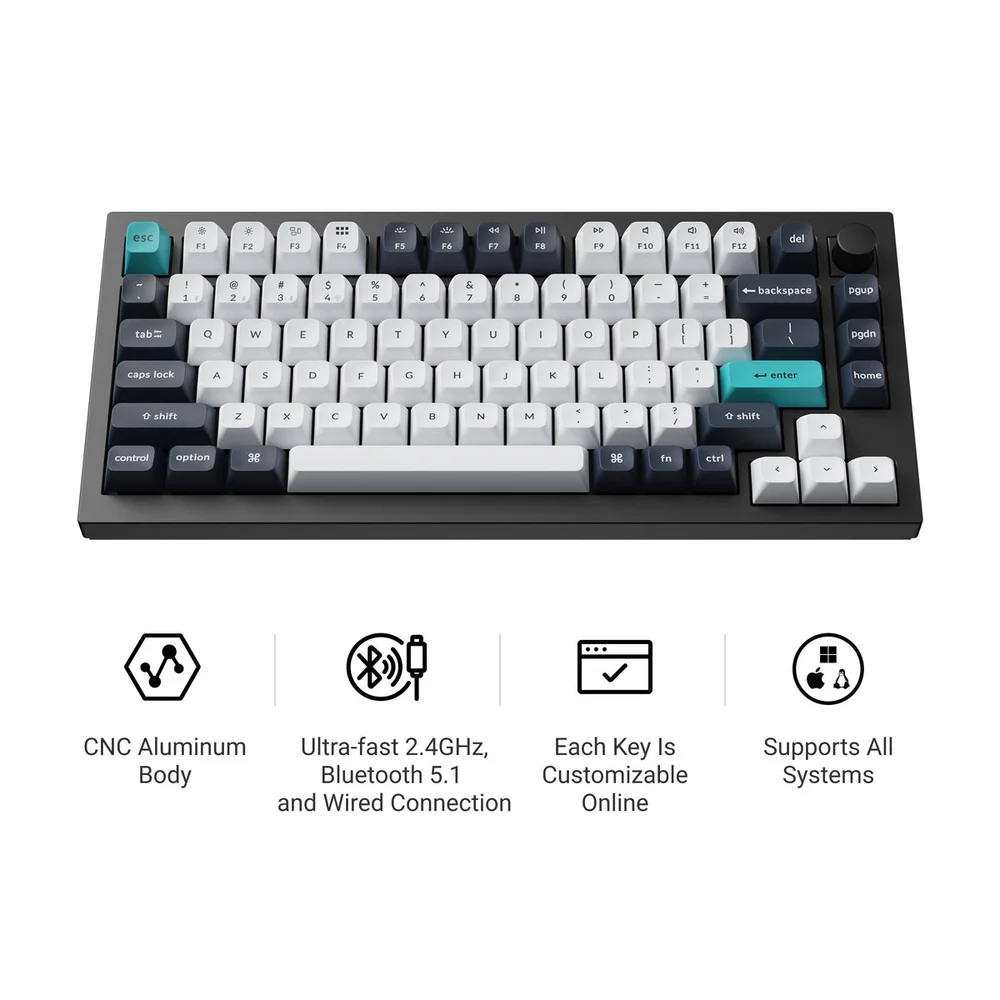
Review basis: This is a research-based editorial review of manufacturer documentation and published product specifications, not a hands-on test. Ratings reflect documented features and buying tradeoffs; performance claims are attributed to their sources.
For the buyer who wants to adjust the keyboard
The Keychron Q1 Max is best suited to someone who wants a mechanical keyboard they can personalize over time. Its 75-percent layout preserves a function row and arrow keys while removing the number pad, creating more mouse space than a full-size board. The aluminum case, knob and replaceable switches make it feel like a desk component to configure rather than a disposable accessory. It is less suitable for a buyer who wants the thinnest keyboard possible or has no interest in choosing switches, keycaps or software mappings.
Specify the package carefully
Keychron sells fully assembled and barebone versions. The assembled model includes switches and keycaps; the barebone version requires both to be supplied separately. That distinction can turn an apparently cheaper listing into a more expensive project. Switch options also change the typing behavior, so a review of the Q1 Max platform cannot establish one universal feel. The hot-swap sockets make later experimentation possible without soldering compatible switches. This is a meaningful ownership advantage for enthusiasts, although buying several switch sets can quickly exceed the cost of the original keyboard.
Connections with a clear hierarchy
The Q1 Max supports wired USB-C, a 2.4GHz receiver connection and Bluetooth pairing with up to three devices. Keychron specifies 1,000Hz polling for wired and 2.4GHz operation, with a lower Bluetooth rate. For ordinary office work, device switching may matter more than that figure; for responsiveness-focused use, choose the connection accordingly. QMK firmware and the Keychron Launcher provide remapping and macro options. A workplace computer with software or browser restrictions may limit customization, so verify that the tools fit your environment before making them the reason for purchase.
A substantial object
At about 1.72 kilograms assembled, the Q1 Max is much closer to a permanent desk keyboard than a travel companion. Its height also differs markedly from a laptop-style board. Consider wrist position and desk height rather than assuming heavier construction automatically means better comfort. The standard KSA PBT keycaps are not shine-through, so RGB lighting is mainly an accent around the keys rather than illuminated legends. Buyers who work in dim rooms and rely on visible letters should notice that detail before choosing the backlight for practical reasons.
Verdict
Buy the Q1 Max for a compact mechanical layout, broad connection options and the ability to change key behavior and physical components. It is a stronger fit for an enthusiast's fixed workspace than for a commuter's bag. A lighter plastic board can offer similar functional flexibility at a lower total commitment, while a low-profile office keyboard may be more comfortable for someone accustomed to laptop keys. The Q1 Max earns its premium through construction and customization opportunities. Its weight and complexity are worthwhile only if those are qualities you actually want to live with.
Sources
What works well
- Hot-swappable switches
- Wired, 2.4GHz and multi-device Bluetooth
- Compact layout retains function row and arrows
What to consider
- Approximately 1.72kg assembled
- Barebone package needs switches and keycaps
- Standard key legends do not shine through
At a glance
- Layout
- 75%, ANSI, knob
- Case
- Aluminum
- Connections
- USB-C; 2.4GHz; Bluetooth 5.1
- Polling
- 1,000Hz wired/2.4GHz; 90Hz Bluetooth
- Battery
- 4,000mAh
- Weight
- 1,724g ±10g assembled