Office & Productivity / Review
Kensington SlimBlade Pro Trackball Review: Stationary pointing for a crowded workstation
The Kensington SlimBlade Pro Trackball is most compelling when desk space is limited or a conventional mouse's repeated travel feels inconvenient. The device stays in one place while the fingers move the ball. Its ambidextrous…
Review basis: This is a research-based editorial review of manufacturer documentation and published product specifications, not a hands-on test. Ratings reflect documented features and buying tradeoffs; performance claims are attributed to their sources.
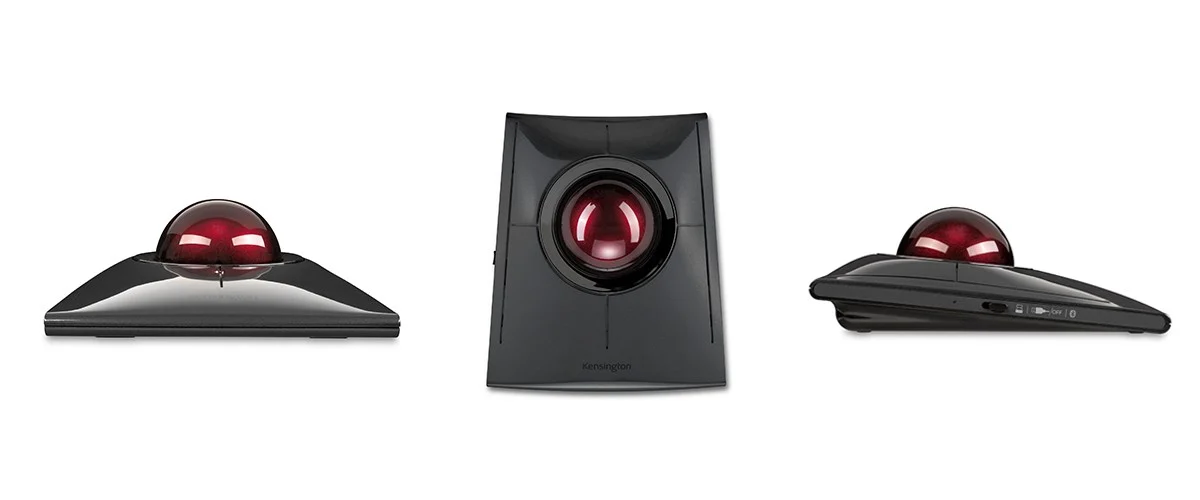
The Kensington SlimBlade Pro Trackball is most compelling when desk space is limited or a conventional mouse's repeated travel feels inconvenient. The device stays in one place while the fingers move the ball. Its ambidextrous arrangement also provides an alternative to strongly sculpted right-hand mice, making it worth considering for users who want to change which hand performs pointing tasks.
This review covers the original black K72080WW SlimBlade Pro, rather than assuming every later EQ variant has identical materials or packaging. Kensington documents Bluetooth, 2.4GHz wireless and wired connection options. That flexibility helps the trackball fit a desk with different computers or changing connection requirements.
A different movement pattern
Finger-operated trackballs change the relationship between hand movement and pointer movement. Large sweeps can be made by rolling the ball, while small corrections use controlled finger motion. This can be convenient for a crowded workstation, but it requires practice if the user has spent years moving a mouse across a pad.
The SlimBlade's ball-twist scrolling is a distinctive interaction. It keeps scrolling close to the same control surface used for pointing, which can be useful in long documents and timelines. It may also feel unfamiliar at first. A short trial should include scrolling, dragging, selecting text and making small adjustments in the actual applications used for work.
An ambidextrous design does not mean every hand will find the button positions equally comfortable. Reach and finger coordination matter. Likewise, reduced movement across the desk should not be presented as a guarantee of pain relief. The appropriate input device depends on personal fit, workspace arrangement and the tasks performed throughout the day.
Maintenance and software are part of the product
A trackball's rolling surfaces can accumulate dust and residue, affecting movement. Regular cleaning according to the manufacturer's instructions is therefore a normal ownership task. This is different from simply wiping the exterior of a mouse. The benefit of a stationary device is strongest when the owner is comfortable maintaining the ball and its support points.
Configuration software can assign buttons and tailor behavior, but availability depends on the operating system and permissions on the computer. A managed workplace may restrict installation. Check the basic functions and supported customization before assuming a complex shortcut setup will be available on every machine.
The rechargeable design removes routine disposable-battery replacement, while the wired option provides another connection path. Keep the charging routine in mind if the trackball is shared among several desks. Wireless freedom is useful, but a stationary device does not necessarily need to be wireless to perform its central job.
Our verdict favors the SlimBlade Pro for users willing to learn finger-based pointing and who benefit from a fixed desk footprint. It is a purposeful alternative, not an automatic upgrade for every mouse user. Its strongest case is a workstation where space, connection flexibility and a different control style solve recurring problems.
Sources and specifications
What works well
- Requires little movement across the desk
- Ambidextrous finger control
- Multiple connection options
What to consider
- Trackball technique takes practice
- Ball and bearings need cleaning
- Not every task benefits from stationary control
At a glance
- Model
- K72080WW
- Control
- Finger-operated, ambidextrous
- Connections
- Bluetooth, 2.4GHz wireless and wired
- Power
- Rechargeable