Music & Instruments / Review
Focusrite Scarlett 2i2 Fourth-Generation Review: Two Inputs With Useful Level Assistance
The fourth-generation Scarlett 2i2 is an attractive interface for a solo musician or a small two-source recording setup. Its most useful additions are controls that help manage input level without turning the interface into a…
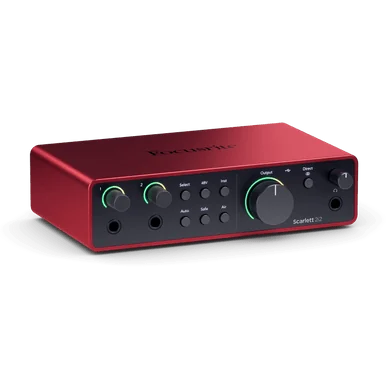
The fourth-generation Scarlett 2i2 is an attractive interface for a solo musician or a small two-source recording setup. Its most useful additions are controls that help manage input level without turning the interface into a complicated studio hub.
What the input count means
Focusrite specifies two microphone preamps and a two-input, two-output interface. That suits a vocal and instrument pairing or another small session, but the input count remains a firm limitation. A buyer planning several microphones at once should count those sources before deciding that a popular compact interface is enough.
Auto Gain and Clip Safe help with level setup and adjustment. Focusrite's own guide states that Clip Safe operates only up to 96 kHz, not at the higher 176.4 or 192 kHz settings. That is a more useful detail than a blanket promise that clipping can never happen.
Think through the recording chain
An interface needs to be considered alongside the microphone, headphones or monitors, computer and software. Confirm operating-system support and the required connections before ordering. Budget for the cables you actually need rather than assuming every connection is covered by the box contents.
For a solo performer, reachable controls and a repeatable setup can matter more than extra channels. For a band rehearsal, the inability to record each source separately may be the decisive drawback. Buying slightly beyond a genuinely planned need can be sensible; buying channels for an imagined studio often is not.
Verdict
The 2i2 makes a strong case for a small recording desk where two simultaneous inputs are enough and level assistance is useful. It is not a substitute for listening, leaving sensible headroom and understanding the signal path. Choose it for a defined session layout, and step up to a larger interface only when the source count or routing requirements justify it.
Sources and product information
What works well
- Two microphone preamps
- Auto Gain and Clip Safe assistance
- Compact two-source workflow
What to consider
- Only two simultaneous inputs
- Clip Safe unavailable above 96 kHz
At a glance
- Inputs/outputs
- 2 in / 2 out
- Mic preamps
- 2
- Clip Safe limit
- Up to 96 kHz