Office & Productivity / Review
Epson RapidReceipt RR-600W Review: A document workflow for receipt-heavy desks
The Epson RapidReceipt RR-600W is aimed at a desk where receipts and invoices arrive regularly enough to justify a dedicated capture routine. It combines a sheet-fed duplex scanner with software intended to extract and organize…
Review basis: This is a research-based editorial review of manufacturer documentation and published product specifications, not a hands-on test. Ratings reflect documented features and buying tradeoffs; performance claims are attributed to their sources.
The Epson RapidReceipt RR-600W is aimed at a desk where receipts and invoices arrive regularly enough to justify a dedicated capture routine. It combines a sheet-fed duplex scanner with software intended to extract and organize receipt information. The appeal is reducing repeated manual entry and turning loose paper into a searchable archive, rather than simply producing occasional image files.
Epson rates the scanner at up to 35 pages or 70 images per minute under its stated conditions, with both sides captured in one pass. The distinction matters: images per minute counts the two sides of a sheet separately. Real workflow time also includes preparing paper, correcting recognition, naming files and putting the result somewhere useful.
Batch capture is only the first stage
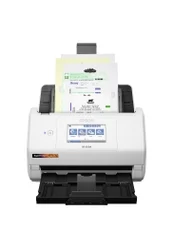
A 100-page automatic feeder is useful for a stack of compatible documents, while the touchscreen provides direct control. Mixed receipts still require judgment. Very small, curled, damaged or unusually thin originals should be handled according to the manual rather than simply added to the same stack. Removing staples and checking the paper path is part of making scanning repeatable.
The receipt-oriented software can extract information and export it for use in other applications. That can save time, but recognized values should be checked against the original before being relied upon. A smudged amount, an unusual date format or a faded merchant name can lead to a plausible-looking error. Automation is most useful when it reduces routine work while preserving a review step for important fields.
Searchable PDFs also make ordinary office documents easier to retrieve. The value depends on a consistent filing method: a folder full of unnamed scans is only a different form of clutter. Decide whether files will be organized by client, month, project or document type before processing a large backlog.
Check the exact software package
The RR-600W has appeared in different bundles, including a Value Edition. Included applications, licenses and supported operating systems should be confirmed against the actual package being purchased. A product family description from launch does not guarantee that every current retailer supplies the same software entitlement.
The scanner can also support direct USB-memory capture, which is useful when a computer-based workflow is not immediately available. That does not remove the need to manage the resulting files, backup copies and access permissions afterward. Receipts and invoices can contain private details, so storage location should be an intentional choice.
This is a sheet-fed document scanner, not a flatbed for bound books or delicate originals that should not travel through rollers. Our verdict is favorable for small offices with a recurring paper backlog and a willingness to establish a filing routine. It is less compelling for occasional scanning that a phone already handles adequately. Buy it for sustained document flow, and judge success by usable records rather than headline feeder speed.
Sources and specifications
What works well
- Single-pass two-sided scanning
- Batch feeder and touchscreen
- Receipt-data workflow and searchable documents
What to consider
- Recognized data needs review
- Software bundle varies by package
- Not a flatbed for bound or fragile originals
At a glance
- Type
- Wireless desktop duplex document scanner
- Rated speed
- Up to 35ppm / 70ipm under specified conditions
- Feeder
- 100-page automatic feeder
- Display
- 4.3in touchscreen