Automotive & Vehicles / Review
Garmin Dash Cam Mini 3 Review: A Small Camera With a Deliberately Narrow Brief
A screenless 1080p camera makes sense when discreet installation matters more than maximum resolution.
Review basis: This is a research-based editorial review of manufacturer documentation and published product specifications, not a hands-on test. Ratings reflect documented features and buying tradeoffs; performance claims are attributed to their sources.
The buying judgment
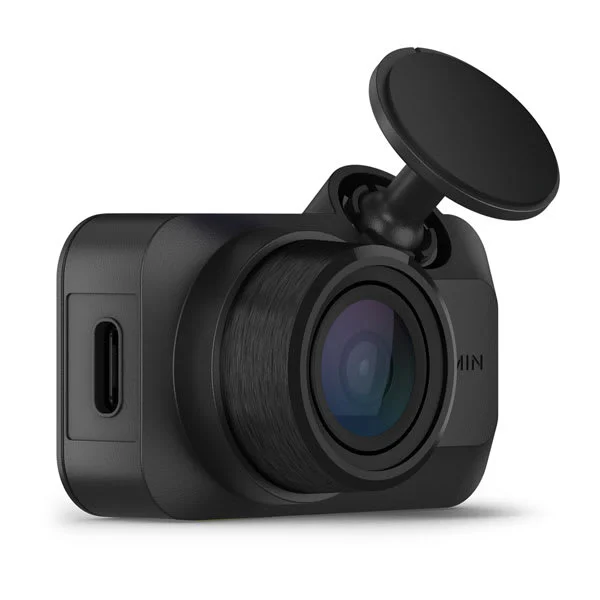
The Dash Cam Mini 3 is most persuasive when a driver wants a small, unobtrusive recording device rather than another display on the windshield. Its 1080p resolution and 140-degree view establish a deliberately modest recording brief. The built-in Clarity polarizer is a useful part of that brief: it addresses reflections at the lens instead of asking the owner to buy and fit a separate filter. This is a product to choose for placement and straightforward coverage, not simply because a smaller camera looks more advanced.
What the compact design changes
A screenless body keeps the hardware visually quiet, but it shifts setup and clip review toward the phone. Before deciding where to attach it, check the view in the companion app from the actual driving position. A camera tucked behind a mirror can still be blocked by windshield trim or a poorly positioned wiper sweep. The important question is whether the chosen position produces a useful view while leaving normal visibility clear. Physical size alone does not answer that question.
Resolution and expectations
Full HD remains useful for recording the broad sequence of a journey, but buyers who expect generous cropping flexibility should compare a higher-resolution model. A wide-angle scene spreads available pixels across a large area. That makes a distant registration plate a different problem from understanding which vehicle entered a lane. Neither a resolution label nor a polarizer promises readable plates in every light, speed or weather condition. The Mini 3 is easier to justify when the sequence matters more than extracting tiny distant detail.
Plan the complete installation
Think beyond the camera when comparing packages. Power routing, a suitable memory card and access for removing that card all affect daily ownership. Decide whether you want only normal driving recording or a parked-car arrangement, then match Garmin’s compatible power accessories to that plan. A switched vehicle socket and a continuously powered installation are different purchases. If the car is shared, make sure the person who needs a clip can retrieve it without relying on one unavailable phone.
Who should choose it
The Mini 3 fits a driver who values a discreet front camera and is comfortable using an app. It is less compelling for someone seeking an onboard playback screen, a full front-and-rear kit or a substantial resolution upgrade. Compare the total installed cost with those alternatives, including their extra cameras and wiring. Its value comes from doing a restrained job in a small footprint. Pay for that restraint only if it matches how you actually intend to record and retrieve journeys.
Sources
What works well
- Small screenless form
- Built-in polarizing filter
- 140-degree forward view
What to consider
- 1080p limits cropping headroom
- Phone-centered setup and review
- Accessories affect complete installed cost
At a glance
- Recording
- 1080p
- Field of view
- 140 degrees
- Filter
- Built-in Clarity polarizer
- Form
- Screenless compact dash camera